Everything you love,alive on one wall.
A desktop app that brings everything you love, from your own files to the open web, alive on one wall.
Fill a wall with everything you love and watch it come alive. Open a folder and your own video pours in, or pull tonight's finds straight from the open web. Same wall, same glow, side by side. Pop out what catches you, fill the whole screen with it, step into the frame with your own camera. All of it on your own machine, yours alone.
Live in your browser, nothing here is a video, it's all real. Pop a tile out, loop it, pulse the whole wall.
A faithful but deliberately incomplete preview, locked to a sample set in a browser sandbox. The full Seraglio runs native on your machine, fuller and more polished: your own files and the open web, the browser companion, real windows spread across every monitor, and the rest of the goodies a web page can't do.
Pop-outs stacking in one corner?
That's the browser, not Seraglio. Some browsers stop a web page from placing windows (Brave with Shields up is the usual one, or a full-screen window). Lower Shields for this site, or use a normal window, and they spread out. The native app places every window itself, this limit is the browser's alone.Every move, under your hands.
The preview above runs a deliberately limited set. This is the full instrument the native app gives you: every control a key or click away, nothing buried in a menu. Learn a few and most of it is yours.
Hold a moment
Pull one close and keep it.
Shape the room
The whole wall answers at once.
Tune the wall to taste: how many, how fast, how wide.
Yours alone
The keys that make it safe to fall in.
A taste of this is live in the preview above, press ? in it to feel it. The rest is waiting in the full app.
Three steps to a full wall.
-
Fill it your way.
Open a folder and the wall fills instantly, sampling across everything in it. Or start from the open web: a quick send from your browser drops a clip straight onto the wall. Mix both, or live in one. Let it run: tiles refresh and rotate on their own while you set the layout, the columns, the size, until it looks right.
-
Pop out the ones that catch your eye.
One pulling at you from across the wall? Click to pop it into its own player: drag it, resize it, send it fullscreen. Keep as many open as you like; they stay put while the wall keeps moving behind them. Want it all at once? One click tiles every popout across the whole screen.
-
Then play with the controls.
Loop-lock a perfect moment, switch on Synced Loop Mode to bring several loops cresting together, Pulse the whole wall to a beat, step into the frame with your own camera. Then dim it or cut it all to black in an instant, whenever you want.
Built for getting lost in all of it.
Nine ways in, and the wall never stops moving.
The living wall
A masonry wall of everything you love, your own files, the open web, or both at once, sampled and refreshed so it fills the whole screen and never stops moving.
Persistent popouts
Pull any clip into its own window. Drag, resize, fullscreen; it stays pinned right where you put it while the wall reshuffles around it.
Fill the screen
One click and every popout, your camera among them, snaps into a grid that covers the monitor edge to edge. The entire screen, full of everything you love, in an instant.
Precision loop-lock
Lock the few seconds that matter into a clean loop, tuned to the right length for each clip. Line several up and they fall into sync, cresting together.
Pulse
Set a tempo and the whole wall moves to it, breathing as one. Take it from a slow drift to a hard, fast pulse, then let it ride.
Live cam overlay
Bring your camera into the frame and be in the room, present among everything you love, not just watching it.
From the open web
Find something out there you love? Send it from your browser and it lands on the wall in its own player, looping in perfect sync with everything else. Build a whole wall this way without owning a single file, or fold it in beside your own. Either way, it's home.
Saved rooms
Arrange a wall you love, popouts and all, and save it as a room. Reopen it later in a tap and the whole room returns exactly as you left it, your own files and your web finds alike, right where you put them. Build it once, keep it for good.
Your sanctuary
It runs entirely on your own machine, with no account and nothing in the cloud. Cool the whole wall down, or cut it to black, in a single keystroke the moment you want to.
The whole web, onto your wall.
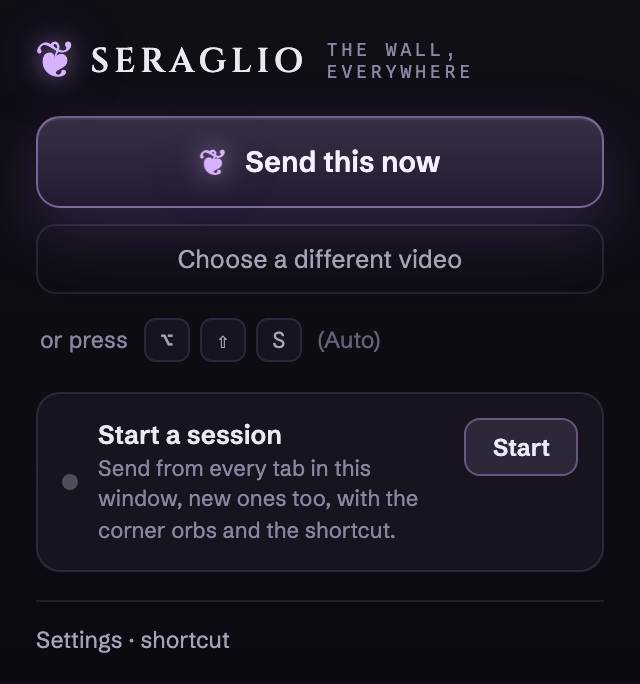
A featherweight browser companion comes with Seraglio. Find something you love anywhere on the open web and send it to the wall in a single gesture, where it loops with everything else. Build a whole wall this way, or fold the web in beside your own files.
 One gesture, from anywhere. Tap a send orb or press the shortcut, and the video flies to your wall. No menus, no hunting.
-
A send orb in every corner. Start a session and the nearest corner is always a flick away, even as you open tab after tab chasing keepers.
-
Yours, and quiet. No account, nothing uploaded. The companion just hands a link to the app on your machine. Works in Chrome and Firefox.
Not a feed. Not a subscription.
Buy it once, and it's yours.
From a single laptop to a wall of monitors, Seraglio runs on your own machine and asks nothing of the cloud. No account, no monthly bill, no catalog that quietly changes on you. The wall you build is yours, the rooms you save are yours, and what you watch stays on your machine, yours alone.
I made Seraglio for myself first. I wanted everything I love gathered onto one wall, on my own machine, arranged the way I like it and always moving, instead of scattered across apps and feeds that forget me the moment I scroll past. Something I could fall into for an hour and dim in a single keystroke. It turned out I'm not the only one who wanted that. I hope it becomes yours the way it became mine.
Pay once. The whole palace.
One-time, fully unlocked, no subscription ever. $39 is the launch price; it goes to $49 at full release.
Less than three months of one streaming subscription, and it's yours for good.
- Everything it does: the living wall (your files and the open web), popouts, fill-the-screen, loop-lock, Pulse, camera overlay
- A license key good for up to 3 of your machines
- Native builds for macOS, Windows & Linux, with every v1 update free for life
- Future major versions (v2+) are an optional upgrade, and owners always get a loyalty discount
- Private checkout, receipt, and instant download
You deserve it.
Get Seraglio · $39 14-day, no-questions-asked money-back guarantee. Not for you? Write to us and it's done. macOS · Windows · LinuxQuestions, quietly answered.
Is this a one-time purchase, or a subscription?
What if it isn't for me?
How does my license work across my machines?
Is it really private, and can I check for myself?
What happens when I pull something from the web?
Can I build a wall entirely from the web, without a folder of my own?
Will it run on my machine, and do I need to be technical?
What can it play?
Will a wall of moving video slow my machine down?
Be first on the wall.
Seraglio opens in August. Leave your email for launch news and a heads-up the moment the beta opens.No spam, just the good stuff.